Fruits Coloring Book & Drawing
- 3.8
- Rating
- 10.00M
- Installs
- Free
- Price
 Analysis by App-foxy
I approached Fruits Coloring Book & Drawing as a simple creative app rather than a full digital art studio, and that distinction matters. Its purpose is easy to understand: choose a fruit illustration, add color, and spend a few quiet minutes making something personal. In my experience, that narrow focus is both its main attraction and its biggest limitation. You are not opening a complicated workspace filled with professional tools; you are opening a relaxed coloring activity that is suitable for casual drawing.
The app belongs to the Art & Design category and is developed by UVTechnoLab. It is free to use and carries an Everyone age rating, so it is an approachable option for families, beginners, and anyone who wants a low-pressure activity. Its public reach is also substantial, with more than ten million installs and an average rating of 3.8 from roughly ten thousand ratings. Those figures suggest that the concept has found a sizeable audience, although the rating also tells me not to treat it as a polished replacement for advanced illustration software.
How the coloring experience feels today
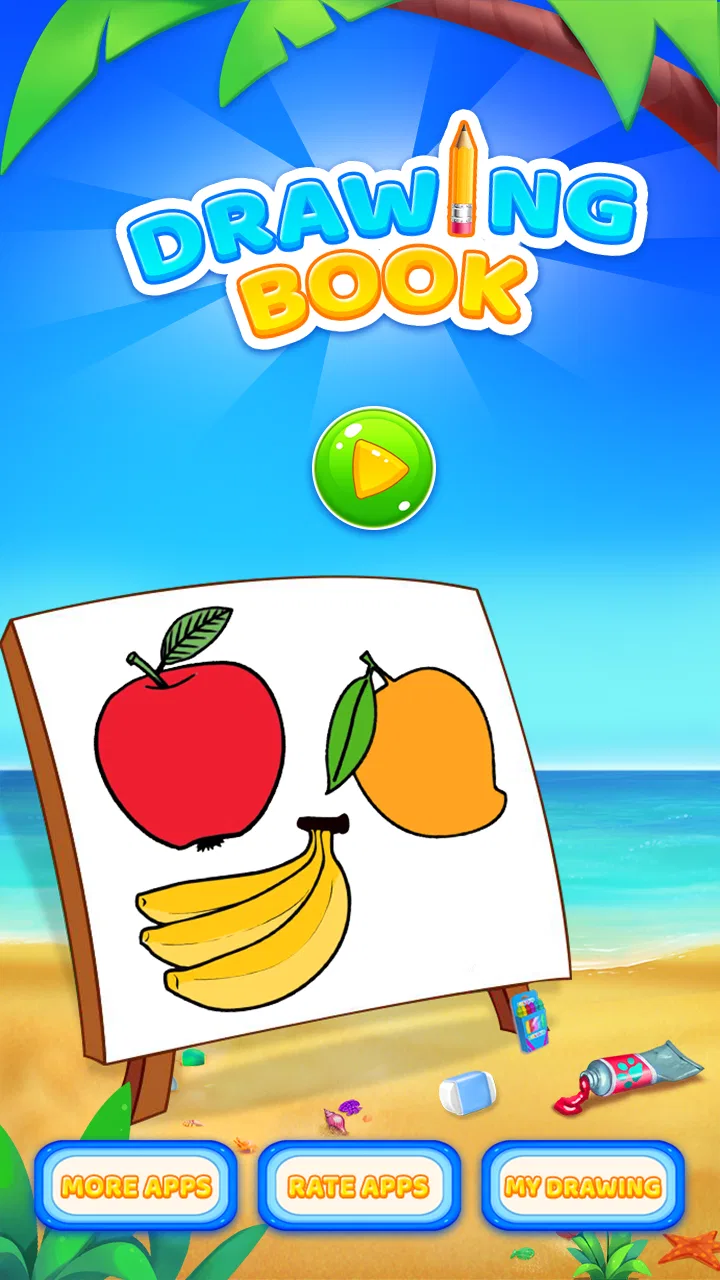
The first thing I noticed is how quickly the app gets to its central activity. There is no need to learn a complex workflow before making progress. The fruit theme gives the experience a clear visual direction, which is helpful for younger users and for adults who do not want to decide what to draw from a blank canvas. A banana, apple, orange, or similar subject gives you an obvious starting point and a familiar shape to work with.
You May Also Like

 AccuWeather: Weather Radar
AccuWeather Review: A Quick, Clear Forecast for Everyday Decisions
For everyday plans, the best forecast is the one you can understand quickly. AccuWeather makes rain timing, radar, and local conditions easy to act on, with a few trade-offs.

 Hill Climb Racing
Why Hill Climb Racing Still Turns Crashes Into One More Run
A tiny car, a bumpy hill and one more upgrade: Hill Climb Racing keeps resurfacing because its simple chaos makes every near-miss feel personal.

 AliExpress - Shopping App
AliExpress Makes Global Shopping Feel Personal, but Shoppers Bear the Risk
AliExpress turns a global marketplace into a pocket-sized discovery engine. Its reach is useful, its shopping loop compelling, and its trade-offs easy to miss.

 Lords Mobile: Kingdom Wars
Lords Mobile Is a Kingdom-Building Routine, Not a Quick Match
A case-by-case verdict on the building, battles, device demands, and social commitments that make Lords Mobile rewarding for some players and exhausting for others.

 PDF Scanner app - TapScanner
TapScanner Makes Paperwork Easier to Capture, Check, and Share
TapScanner makes scanning with a phone feel less like a rescue operation and more like a dependable step in getting work done. Its capture tools are useful, though not flawless.

 Block Blast!
 Shows How Much a Puzzle Game Can Leave Out
A quiet grid game shows why puzzle players increasingly value instant clarity, repeatable skill and low-pressure play—and where the genre still needs to catch up.
More From Our News Desk
View All News


That simplicity makes it useful in everyday situations. I can imagine using it during a short break, handing it to a child while waiting somewhere, or opening it in the evening when I want something more active than scrolling but less demanding than a serious drawing session. It also works well as a gentle introduction to digital coloring because the subject matter is recognizable and the creative task is immediately understandable.
One practical tip is to treat each picture as a small composition exercise instead of trying to make every fruit realistic. A purple pear, blue apple, or multicolored citrus slice can be more enjoyable than copying nature exactly. This approach is especially useful for children, because it turns the app into a place for experimentation rather than a test of whether the colors are “correct.”
The experience is best when I approach it with modest expectations. The app’s store summary describes drawing and coloring fruit images, and that is exactly the kind of activity it is built around. I would not choose it when I need layers, detailed brush control, advanced selection tools, or a professional export workflow. Those needs are better served by a general illustration app. Here, the value comes from having a focused subject and a straightforward creative routine.
A good fit for short creative sessions
For a parent, the Everyone rating makes the app easier to consider as a family-friendly option. It can provide a child with a contained activity that does not require knowledge of art terminology. The fruit theme is also useful for early conversations about color, shape, and observation. You can ask a child to color an apple in different ways, compare warm and cool choices, or create a fruit basket with a consistent palette.
Adults can use the same structure differently. I find that a limited subject can reduce decision fatigue. Instead of staring at an empty canvas and wondering what to create, I can concentrate on choosing a mood: soft pastel colors for a calm image, strong contrasting colors for something energetic, or a restricted palette for a cleaner result. That makes the app more approachable than a blank-page drawing tool when I only have a few minutes.
There is also a useful distinction between this app and coloring books designed entirely for intricate patterns. Fruit illustrations are generally easier to understand at a glance, so the activity can feel less repetitive for someone who prefers recognizable objects. On the other hand, users who enjoy highly detailed mandalas, landscapes, characters, or complex line art may find the subject range too narrow.
What the current version tells me
The current version is 21.0.0, while the app was released on June 11, 2017. That combination points to a product that has remained active over time rather than a newly launched experiment. I see the version history as evidence of continued maintenance, but I would separate that fact from any assumption that the app has become a modern professional art suite. A newer version number does not automatically mean deeper creative tools.
For existing users, the most reassuring part of that evolution is continuity. Someone who already enjoys a fruit-centered coloring routine is likely to appreciate an app that has stayed available and maintained across several years. New users also benefit from choosing a product with a long presence instead of an app that may disappear after a short period. Still, version activity should be viewed as a sign of ongoing product life, not as a promise of a particular feature or redesign.
My practical advice is to judge the current release by the quality of the basic interaction on your own device. The minimum operating system is Android 6.0, which makes the compatibility requirement relatively accessible for older Android hardware. Even so, the experience can vary with screen size, touch sensitivity, and device performance. A larger display will usually make coloring more comfortable, while a small phone screen may make precise areas feel cramped.
If you are installing it for a child, I would spend a minute setting up the device first. A case, a comfortable brightness level, and a stable surface can matter more than advanced app settings in this kind of activity. I would also show the child how to undo an unwanted mark before leaving them to explore. That small lesson reduces frustration and encourages experimentation because mistakes no longer feel permanent.
Small workflows that make it more enjoyable
A useful workflow is to choose a color plan before filling the picture. For example, I might decide on three main colors and one accent, then apply them consistently across the fruit. This creates a more finished-looking result without requiring sophisticated tools. It also helps beginners understand that good coloring is not only about selecting attractive individual colors; it is about how those colors work together.
Another approach is to make several versions of the same type of fruit with different moods. One can use bright colors, another can use muted shades, and a third can deliberately ignore realistic coloring. This turns a single illustration into a short creative challenge. It is a more rewarding use of the app than rushing through every available image simply to complete them.
I also recommend zooming in mentally, even if the interface does not offer a specialized precision workflow. Work slowly around edges and use broad strokes in open areas. On a phone, rotating the device can sometimes give your hand a more comfortable angle, particularly when coloring a long or narrow shape. These are simple habits, but they make a noticeable difference in a basic touch-based coloring app.
For family use, a shared theme works well. Everyone can color fruit for a pretend picnic, a seasonal basket, or an imaginary smoothie menu. The activity then becomes collaborative rather than solitary. It can also help a child practice naming colors and fruits without making the session feel like a lesson.
Where it differs from usual alternatives
Compared with a traditional paper coloring book, the app is more convenient because it does not require pencils, sharpeners, or a place to store finished pages. Digital coloring also makes experimentation less intimidating: if a choice looks wrong, I can try again without wasting paper. That makes the app particularly suitable for quick sessions and for children who are still developing confidence.
Paper still has advantages. The feel of crayons or colored pencils is more tactile, and physical pages can be displayed or kept as a record. If your goal is sensory play, handwriting practice, or a screen-free family activity, a printed book remains the better choice. This app is not a replacement for that experience; it is a convenient alternative when portability and easy cleanup matter more.
Compared with broad drawing apps, Fruits Coloring Book & Drawing is less intimidating but also less flexible. A blank canvas offers more freedom, while a dedicated fruit collection provides a clearer path from opening the app to finishing an image. I would recommend the fruit app to a beginner who wants structure, and a general drawing app to someone who already knows how to use brushes, layers, opacity, and editing tools.
It also differs from highly elaborate coloring platforms that focus on large libraries, intricate designs, or extensive customization. Those alternatives may be better for users seeking a long-term hobby with many themes. This app makes more sense when you specifically enjoy fruit illustrations or want a lightweight activity that does not ask you to learn a large system.
Limitations worth considering before installing
The focused theme can become repetitive. If you want animals one day, buildings the next, and landscapes after that, a fruit-only collection may not hold your attention for long. I would skip it if variety is the main reason you enjoy coloring apps. Its strongest audience is someone who likes the simplicity of a defined subject, not someone searching for an unlimited art library.
The free price is appealing, but free apps can involve compromises in presentation or monetization. I would pay attention to how interruptions affect your session and whether the interface feels comfortable on your particular device. Even a good coloring activity loses some of its calm when navigation or advertising repeatedly breaks concentration. This is one reason I would test it personally before recommending it as a child’s main creative app.
Another limitation is the likely ceiling for artistic control. A person who wants to blend subtle shades, build realistic lighting, or create a polished illustration may outgrow the experience quickly. The app is designed around coloring existing fruit images, so it should not be evaluated by the standards of a full drawing workstation. Its simplicity is intentional, but that simplicity also limits what an experienced artist can accomplish.
The rating of 3.8 is consistent with my balanced view: the idea is accessible and useful, but it may not satisfy every expectation. A user who wants a quick, friendly coloring activity may consider the trade-off worthwhile. A user expecting a rich, highly customizable art tool should choose something else from the start rather than hoping the fruit theme will compensate for missing depth.
Who should use it, and who should pass?
I would recommend it to beginners, families, casual colorers, and adults who enjoy short creative breaks. It is also a reasonable choice for someone using older Android hardware, since Android 6.0 is the minimum operating system. The free access lowers the barrier to trying it, and the Everyone rating makes it easier to consider for shared household use.
I would be more cautious about recommending it to professional designers, serious digital painters, or users who need their artwork to move into a larger editing workflow. Those people will probably benefit more from an app built around layers, advanced brushes, precise selections, and broader file handling. The fruit theme may still be useful for a quick warm-up, but it should not be their primary studio.
If you are unsure whether it will suit a child, ask what kind of activity they enjoy. A child who likes choosing colors and filling familiar shapes may settle into it quickly. A child who prefers building scenes, inventing characters, or changing the structure of a drawing may feel constrained. That distinction is more important than age alone.
What I would watch as the app continues
Because the product has reached version 21.0.0 after being available since 2017, I would watch for improvements that preserve its easy entry while addressing the needs of returning users. Useful progress would include a smoother way to manage completed pictures, more variety within the fruit theme, and controls that improve precision without turning the app into a complicated studio. The best evolution would add depth gradually rather than burying the simple coloring activity under menus.
I would also look for a clearer balance between beginner friendliness and creative freedom. Existing users may appreciate familiar navigation, while new users benefit from immediate access to the coloring area. Any future changes should protect that quick start. If new tools appear, they should feel optional for a child or casual user and available for someone who wants to spend longer refining an image.
My final view is that Fruits Coloring Book & Drawing succeeds when it stays in its lane. It offers a focused way to color fruit illustrations, and that focus can be genuinely relaxing, convenient, and approachable. It is not the right choice for advanced digital art, broad subject variety, or a screen-free tactile experience. But if you want a free, family-friendly activity for short creative sessions, I think it is worth trying. The key is to choose it for its simplicity, not to expect it to behave like a professional drawing app.
FAQs for Fruits Coloring Book & Drawing
01What features does the Fruits Coloring Book & Drawing app offer?
The Fruits Coloring Book & Drawing app provides a variety of features including a wide range of fruit-themed coloring pages, a palette of vibrant colors, and the ability to draw freehand. Users can also zoom in for detailed coloring, save their artwork, and share it on social media platforms.
02Is the app suitable for all ages?
Yes, the app is designed to be user-friendly and suitable for all ages. Its simple interface makes it easy for children to navigate, while the detailed coloring options offer a relaxing experience for adults. Parental controls are available to ensure a safe environment for kids.
03Does the app require an internet connection?
The app primarily works offline, allowing users to enjoy coloring without an internet connection. However, an internet connection is needed for app updates, accessing additional downloadable content, and sharing artwork on social media platforms. Users can enjoy uninterrupted coloring once these features are cached.
04Are there in-app purchases available?
Yes, the app offers in-app purchases. While many features and coloring pages are free, users can buy additional coloring packs and advanced drawing tools. These purchases are optional and enhance the overall coloring experience by providing more variety and creative tools.
05How can I ensure my data is secure while using the app?
The app takes privacy seriously and adheres to strict data protection policies. It collects minimal data, mainly for app functionality and improvement. Users can review the privacy policy within the app settings to understand what data is collected and how it is used, ensuring transparency and security.
Pros
- Wide variety of fruit illustrations.
- Easy-to-use interface for all ages.
- Offline mode available for convenience.
- Supports multiple coloring tools.
- Regular updates with new designs.
Cons
- Contains ads that can disrupt coloring.
- Limited free content without purchase.
- No option to save incomplete work.
- In-app purchases can be pricey.
- Color palette could be more extensive.

Fruits Coloring Book & Drawing
Gallery